Categories
funny

Gmail please fix your spam filter

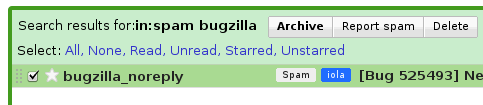
Lately Gmail has been become increasingly frustrating to use. When I check mail in the morning I have about 5 spam mails in my inbox. Even some from Viagra. Even worse, the number of false positives (ham classified as spam) has also been increasing so that I now at least once a day have to resort to looking for legitimate mail in my spam folder. For a spam filter this is the worst case scenario. Actually it seems like Gmail has trouble categorizing spam as seen below. I hope it’s only a UI bug, but something deeper down is definately rotten.

Categories
On the web

The OpenBSD Releases Process

Theo de Raadt talks about the OpenBSD Releases Process.  It’s short but sweet little interesting talk that touches a lot of different aspects about releasing software and doing development. I hightly recommended to anyone who cares about this field, that ought to mean any people doing software. They have a different way about thinking about a lot of things, of course their focus on security is special which also shows off in their release management. What I really liked was that they import stuff into their tree and then they take ownership of it. That way, I think, they avoid a lot of the problem that plague e.g. Ubuntu, like crappy intel drivers in latest Jaunty, the thrashing hell failure, unstable tracker in Jaunty. Of course all that comes at a certain cost, they are running ancient version of some pieces of the tree,  but at least they know that it works.

Categories
Blog

Running Chrome in Ubuntu

Getting Chrome running in Ubuntu is now pretty easy, simple add the following line to /etc/apt/sources.list:

deb http://dl.google.com/linux/deb/ stable main

Then you can install Chrome using the package manager and it will keep itself updated. Sadly the browser is quite alpha (no flash, random errors, no tabs saving on exit) but they update it every week and it runs insanely fast compared to firefox.

Categories
Blog

Making hibernate work after harddrive upgrade

I recently upgraded the harddrive in my trusty old IBM T60. I mirrored the hd using a little dd magic and everything worked fine, including the IBM rescue partition. The only thing that wasn’t working anymore was hibernation in Ubuntu. This was because it relied on wierd UUIDs instead of actual device names. Fixing it was pretty easy, once you know what the problem is. First step is to fix up /etc/fstab so that the swap partition has the right UUID. You can get the UUID of a device using something like:

sudo vol_id -u /dev/sda4

Next step is to fix up the location of the resume partition. Open /etc/initramfs-tools/conf.d/resume and change the UUID to the same as you just put into fstab. Then run:

sudo update-initramfs -u

And you should be running again 🙂

Categories
On the web

Random Ubuntu notes

There’s an annoying problem in Ubuntu 9.04 that if you have set your machine to automatically login, but have a password on gnome keyring manager, then it will prompt you for the password before wireless is enabled. There is a bug about it here on launchpad. And as usual the Ubuntu guys doesn’t seem to want to take responsibility for the software they are providing. Reminds me of this thrashing bug reported over 3 years ago and it’s still open. It’s actiually the first result on google (out of 544.000) if you search for thrashing hell 🙂

Another thing I noticed was that I was looking through the system messages and found the following wierd message.

Jul 17 16:46:35 arj-laptop pulseaudio[3290]: main.c: Called SUID root and real-time and/or high-priority scheduling was requested in the configuration. However, we lack the necessary privileges:

Jul 17 16:46:35 arj-laptop pulseaudio[3290]: main.c: We are not in group ‘pulse-rt’, PolicyKit refuse to grant us the requested privileges and we have no increase RLIMIT_NICE/RLIMIT_RTPRIO resource limits.

Jul 17 16:46:35 arj-laptop pulseaudio[3290]: main.c: For enabling real-time/high-priority scheduling please acquire the appropriate PolicyKit privileges, or become a member of ‘pulse-rt’, or increase the RLIMIT_NICE/RLIMIT_RTPRIO resource limits for this user.

Which was easy enough for me to fix (sudo addgroup arj pulse-rt), though it still would have been nice if this was done properly. This might help some people who has been getting skipping music.